Applications in cocoa and cocoa touch have an event queue associated to them, this event queue will be filled with events from multiple sources. In order to handle the stream of event, each application maintain an event run loop that accepts and dispatches events in a first in first out order.
When an application is launched the call to UIApplicationMain will create a UIApplication singleton object, this object will be responsible for handling and dispatching the events the system sends to the app events queue.
The application will receive events from sources as:
Each of these events will be handled and processed by the application singleton before being dispatched to the appropriate receivers.
When an application is launched the call to UIApplicationMain will create a UIApplication singleton object, this object will be responsible for handling and dispatching the events the system sends to the app events queue.
The application will receive events from sources as:
- UIControl Actions: these are the actions that are registered using the action/target pattern
- User events: Events from user such as touches, shakes, motion, etc…
- System events: Such as low memory, rotation, etc…
Each of these events will be handled and processed by the application singleton before being dispatched to the appropriate receivers.
UIControl Actions
UIControl actions are the action that are added to a control by calling the addTarget:action:forControlEvents: method, the UIControl will keep record of all the action/target pairs that have been added to it.
When a user perform an event on a control, or when a UIControl calls sendActionsForControlEvents function, the action related to that control event will be sent to the registered target.
Lets take an example:
When a user perform an event on a control, or when a UIControl calls sendActionsForControlEvents function, the action related to that control event will be sent to the registered target.
Lets take an example:
UIButton button = [UIButton new];
[button addTarget:self action:@selector(buttonTapped) forControlEvents:UIControlEventTouchUpInside];
When the user taps on this button, an event will be dispatched to the UIApplication (using a UIControl internal copy of sendActionsForControlEvents), the application will read this action from its event queue and dispatch it in UIApplication sendAction:to:from:forEvent: function, the base implementation of that method will call the action on the registered target, the target will receive buttonTapped method in this case.
If we specify nil for the target:
If we specify nil for the target:
[button addTarget:nil action:@selector(buttonTapped) forControlEvents:UIControlEventTouchUpInside];In this case the base implementation of sendAction:to:from:forEvent will send the buttonTapped selector to the current first responder.
If the first responder does not implement that action (buttonTapped in our example), then it will be send to the next responder, the system will keep trying to find a valid responder in the responder chain, until there are no more responders in the chain. in that case this action will be dropped.
Using this knowledge we can send an action to the first responder by calling sendAction:to:from:forEvent on the UIApplication singleton and passing nil as the target.
For example we can send resignFirstResponder to the first responder and hence resign the keyboard by doing:
If the first responder does not implement that action (buttonTapped in our example), then it will be send to the next responder, the system will keep trying to find a valid responder in the responder chain, until there are no more responders in the chain. in that case this action will be dropped.
Using this knowledge we can send an action to the first responder by calling sendAction:to:from:forEvent on the UIApplication singleton and passing nil as the target.
For example we can send resignFirstResponder to the first responder and hence resign the keyboard by doing:
[[UIApplication sharedApplication] sendAction:@selector(resignFirstResponder) to:nil from:nil forEvent:nil];User Events
User events such as touches and device motion will be sent to the application event queue, if the user event is anything but a touch then the application will dispatch the call to the first responder, if the first responder couldn’t handle it, the system will follow the responder chain to find an appropriate responder.
For touch events the flow is different, When the system detects a touch on the screen it will send this touch to the application, the application will receive the touch event in its _touchesEvent internal method.
The application will then forward this event using sendEvent to the UIWindow, the window upon receiving this event start the process of hit-testing the views in order to find the one that received this touch.
UIView’s hitTest:withEvent will be used to find the view that is under the touch, the implementation of hit-test will check if the touch is within the view bounds, by calling pointInside:withEvent: in each view.
hitTest and pointInside will be called recursively until it reaches a top most leaf view. this view will be used as the first responder for the touch event.
UIWindow will then send the touch events to this view.
For touch events the flow is different, When the system detects a touch on the screen it will send this touch to the application, the application will receive the touch event in its _touchesEvent internal method.
The application will then forward this event using sendEvent to the UIWindow, the window upon receiving this event start the process of hit-testing the views in order to find the one that received this touch.
UIView’s hitTest:withEvent will be used to find the view that is under the touch, the implementation of hit-test will check if the touch is within the view bounds, by calling pointInside:withEvent: in each view.
hitTest and pointInside will be called recursively until it reaches a top most leaf view. this view will be used as the first responder for the touch event.
UIWindow will then send the touch events to this view.
- (void)touchesBegan:(NSSet *)touches withEvent:(UIEvent *)event;
- (void)touchesMoved:(NSSet *)touches withEvent:(UIEvent *)event;
- (void)touchesEnded:(NSSet *)touches withEvent:(UIEvent *)event;
- (void)touchesCancelled:(NSSet *)touches withEvent:(UIEvent *)event;
When an event is send to a view, this view has three choices:
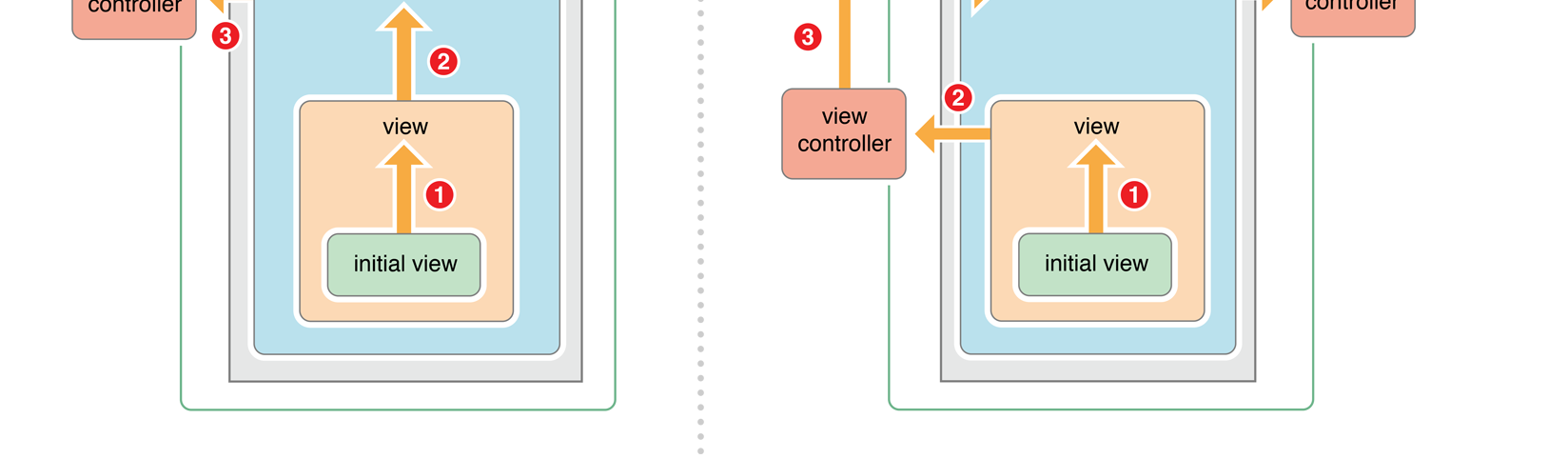
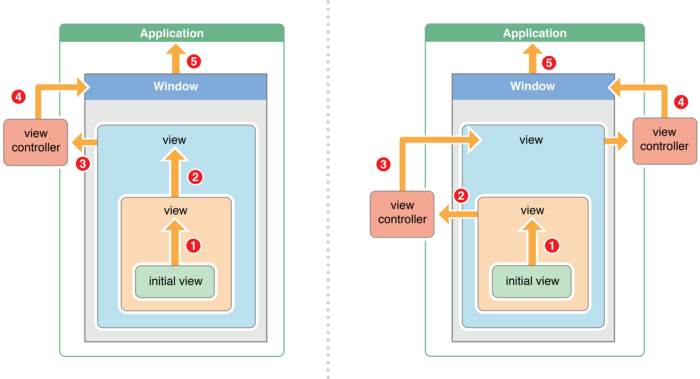
If the view chooses to not handle a touch event, then it will be sent up the responder chain, which will follow this path:
- Since the UIResponder base implementation of the four methods above forwards the event to the next responder, then if the view doesn’t implement a method of them, this method will be forwarded to the next responder.
- A view can implement any method from the above, do some processing, and then call super in order to let the next responder do some additional process.
- A view can implement any method from the above and choose to not forward the event to the next responder.
If the view chooses to not handle a touch event, then it will be sent up the responder chain, which will follow this path:
- The first responder is the hit-tested view (the view under the touch)
- Next responder is its super view
- The chain continues up the view hierarchy until it reaches a view that is associated with a view controller
- That view controller will be the next responder
- If this view controller is a root controller, then the window will be the next responder
- The application is the window’s next responder
- The last responder in the chain is the App delegate
System Events
The system will send events to the application singleton, these system related events will be received by the application singleton and dispatched to the App delegate. The app delegate in turn will receive the events and handle them.
The first responder
Any UIResponder can opt to become the first responder by receiving or calling the becomeFirstResponder method, the first responder will be given the chance to act upon user events when they are received. The touch events however will not be sent to the first responder, these events are sent to the view found by doing a recursive hit-test.
In addition to the above, the first responder will also receive UIControl actions that have nil as their target. (Explained above).
In addition to the above, the first responder will also receive UIControl actions that have nil as their target. (Explained above).

This concluded our journey in the responder chain world, In the next week I will experiment more and more with UIControls and sendActionsForControlEvents to see how would my controls and custom views code changes if I use the responder chain and action/target, I would really like to remove some of the delegation code that I write and use target action from my custom controls.
Источник: medium.com